
Transcribe4 min read
Turn speech into useful notes
Transcribe live speech or an existing recording, with an original transcript and a translation.
Use it for
- Keep notes from a meeting with consent
- Turn a voice memo into editable text
- Understand a recorded talk in another language
Inside the app Enlarge
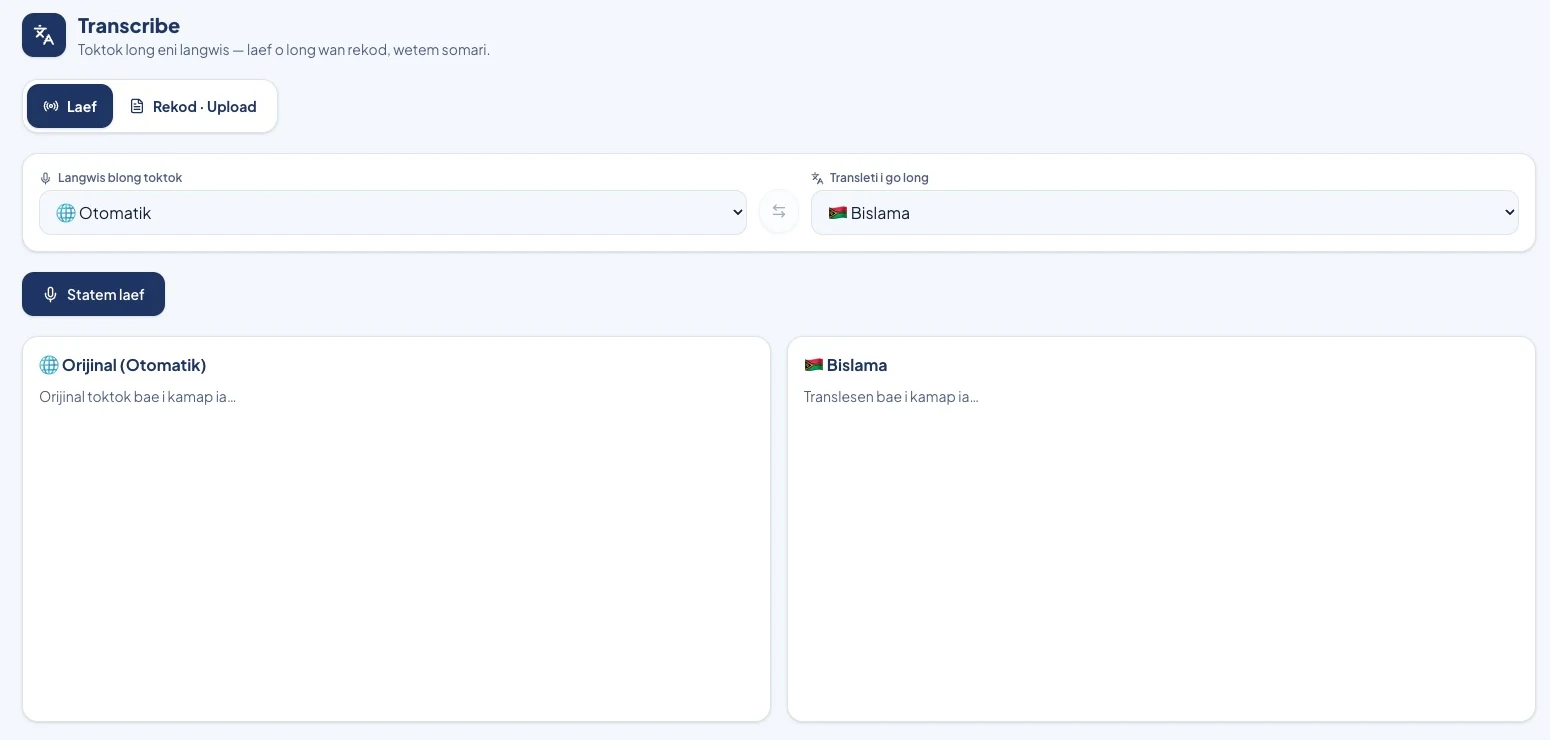
- 1Live / Record · Upload: choose the source
- 2Spoken language / Translate into: choose languages
- 3Original / translation panels: review both
How to use it
- 1
Choose a mode
Use Live for speech happening now. Use Record · Upload to record first or select an existing supported audio/video file.
- 2
Set the languages
Choose the language being spoken, or automatic detection when appropriate. Choose the language you want for the translated text.
- 3
Record or upload
For Live, press Start and allow the microphone, then stop when finished. For a file, select it and wait for processing. Obtain permission before recording other people.
- 4
Review and reuse
Compare the original transcript and translation. Use the copy/download tools, summary controls when available, or Save to keep useful text in your work library.
Good to know
- Use the correct spoken-language setting and clear audio for better results.
- Names, accents, overlapping speakers and noisy audio may be transcribed incorrectly.
- Live text can arrive in segments. This is not a certified translation or a guarantee of a word-perfect transcript.